

Honestly, How Long Does It Really Take to Provision an AWS Landing Zone?
Why Landing Zones Take Longer Than People Expect
A landing zone is how you stop every AWS account from becoming its own little kingdom.
If you have one account, one workload, and one person making changes, you can keep a lot of the architecture in your head. You can create resources directly, fix permissions when they break, and tolerate a few rough edges because the blast radius is small.
That does not last.
Once there are multiple environments, multiple workloads, multiple engineers, and real production risk, the platform has to answer harder questions. Where do workloads live? Who can access which accounts? Where do logs go? Which regions are allowed? What security services are always on? How does a team request a new account without inventing the process again? How do experiments stay out of the control plane?
The answer to those questions is, the Landing Zone.
AWS often describes a landing zone as a Well-Architected, multi-account environment. That is true, but “Well-Architected” is doing a lot of work in that phrase. It implies decisions about identity, logging, security, networking, automation, account vending, operations, and recovery paths. Control Tower can start that process quickly. It cannot make all of those decisions for you.
That distinction is where the timeline gets misunderstood.
If the goal is to click through AWS Control Tower and see a green setup-complete message, the answer can be measured in minutes or hours. If the goal is to give teams a production-ready platform they can safely consume, the real answer is longer.
The Timeline Problem
There is a common version of the AWS landing zone story that sounds like this:
Open AWS Control Tower, answer a few questions, wait an hour, and now you have a secure multi-account landing zone.
That story is not false. It is incomplete.
AWS says the Control Tower console setup takes about half an hour once prerequisites are ready. Many walkthroughs land in the same general range: maybe an hour, maybe a couple of hours, depending on the environment and how much explanation is included.
That is a fair estimate for the wizard.
It is not a fair estimate for production readiness.
Here is the timeline I would use after building one of these for real:
| Outcome | Realistic Time |
|---|---|
| Control Tower landing zone deployed | 30-90 minutes |
| Basic multi-account foundation verified | 1-3 days |
| Internal platform baseline usable by engineers | 2-4 weeks |
| Production-ready landing zone | 6-12 weeks |
| Mature landing zone replacement project | 8-16 weeks |
The fast numbers are real. They are just measuring the start of the work.
What Control Tower Actually Gives You
Control Tower is useful because it handles a real part of the foundation. It gives you AWS Organizations structure, a management account pattern, shared audit and log archive accounts, IAM Identity Center integration, baseline CloudTrail and AWS Config posture, managed controls, and Account Factory as a provisioning path.
That is not trivial. It is a strong starting point.
In this project, I treated that moment as Gate 1: Bootstrap Complete. The gate did not mean “we are production ready.” It meant the control plane was alive, shared accounts existed, access worked, and no workloads were running in the management account.
That is a clean foundation.
It is not the whole platform.
What Production-Ready Actually Means
For this landing zone, production-ready meant the platform had enough governance, automation, and operational clarity that workload teams could safely consume it without every new account becoming a one-off.
That means the decisions nobody sees in the Control Tower wizard matter a lot. OU structure affects policy inheritance and future reorganizations. Account naming affects billing, access, incident response, and human comprehension. DNS ownership determines whether teams can publish services without fighting the platform. CIDR allocation determines whether networking can scale without painful renumbering. Terraform state design determines whether automation can be trusted. Security delegation determines who owns detection and response. Account vending determines whether every new workload starts from a repeatable path or another exception.
None of those are glamorous.
All of them become expensive if they are ignored until after workloads are live.
That is the main difference between a landing zone that exists and a landing zone teams can actually use.
The First Deliverable Was Not Control Tower
In hindsight, the first gate was not Control Tower.
The first deliverable was a runbook and checklist good enough to keep the work honest. Without that, the project turns into a pile of console clicks, infrastructure experiments, half-remembered decisions, and undocumented exceptions.
The runbook described the intended path. The checklist tracked what was actually done. Together they gave the project a memory.
That mattered because the most important rule was also the hardest one to respect:
No workloads until the landing zone is stable.
Once Control Tower is up, it feels like you should start building immediately. But if identity, logging, policy, automation, networking, and account vending are still half-formed, every early workload becomes an exception you have to clean up later.
That cleanup is where teams lose time.
Bootstrap Versus Infrastructure As Code
Another lesson: infrastructure as code is not the same as pretending there is no bootstrap phase.
The first layer of a landing zone is a trust-establishment problem. The management account has to be secured. Organizations has to be enabled. Control Tower has to be launched. Shared accounts have to be created or accepted. IAM Identity Center access has to be verified. The first backend and execution roles have to exist before the rest of the platform can be managed safely.
That work should be deliberate and documented. It does not automatically become better just because it is forced into Terraform too early.
Once the trusted control plane exists, infrastructure as code becomes the right tool for the repeatable platform layer: organization representation, execution roles, networking foundations, security delegation, SCPs, private DNS, policy checks, CI/CD plans and applies, account vending scaffolding, and workload request schemas.
The distinction matters. A landing zone usually starts with a small, trusted bootstrap path. The operating goal is to shrink that path over time, move repeatable work into reviewed code, and avoid pretending the bootstrap exception never existed.
What We Built Beyond The Wizard
The Control Tower wizard did not give us a complete operating model. We had to define and build that part.
The platform baseline included shared security and infrastructure accounts, a dedicated suspended-account path, Terraform state in Shared Services, cross-region backend replication, lockfile-based state locking, execution roles across the key accounts, GitLab OIDC federation, policy checks before apply, GuardDuty delegated administration, a hub VPC, private DNS zones, workload tiering, an account vending input model, and an AFT foundation.
That sentence is dense because the work is dense.
The concrete tools were Terraform, GitLab CI, GitLab OIDC, OPA, Conftest, and AFT. The tools matter, but they are not the point. The point is that infrastructure changes move through reviewed code, short-lived credentials, scoped roles, policy checks, plans, and controlled applies.
Some of the work was code. Some of it was process. Some of it was deciding what not to build yet.
For example, we deliberately used a single shared NAT gateway for the early platform baseline. One NAT gateway per AZ is cleaner for high availability, but it was not justified at this stage. We also deferred Transit Gateway until there is a real multi-VPC routing need.
That kind of decision is part of production readiness too. A good landing zone is not the one with every possible enterprise feature turned on. It is the one where the defaults, tradeoffs, and next steps are understood.
Why Hub-And-Spoke Matters
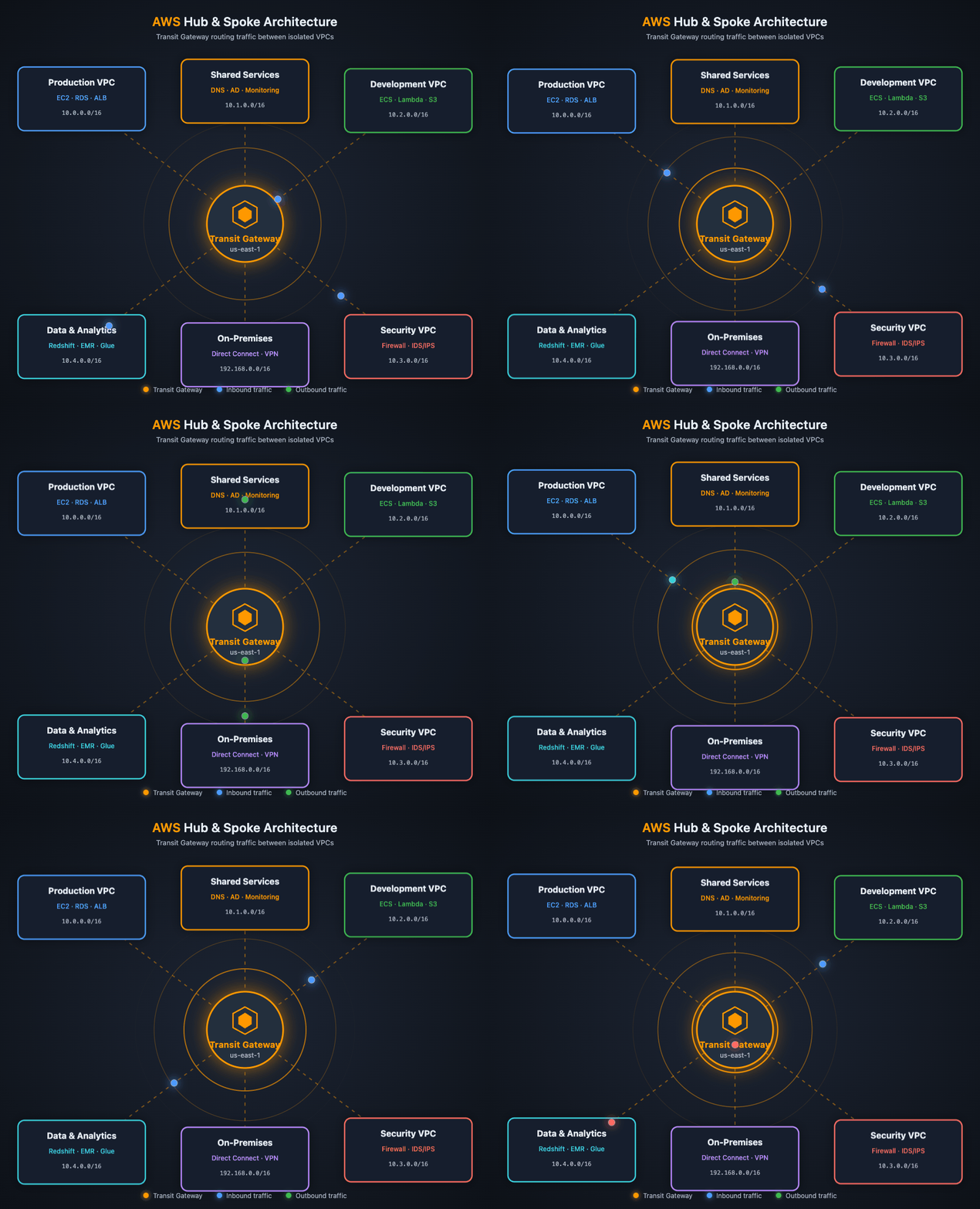
One of the architectural decisions we made early was to use a hub-and-spoke direction for networking.
Control Tower gives you the account and governance foundation, but it does not answer how workloads should connect to shared services, DNS, inspection, egress, private endpoints, or each other.
A hub-and-spoke pattern gives the landing zone a place for shared network services to live. In this project, the Networking account owns the hub VPC, private DNS zones, and the future shared routing layer. Workload accounts can stay simpler: they either remain serverless-only with no VPC, or they attach later as spokes when they have a real networking need.
That last point matters. We did not want the landing zone to create VPCs just for symmetry. A serverless workload should be allowed to stay serverless. A workload that needs private networking can get a VPC and a CIDR slice from its workload family range.
We also did not jump straight to Transit Gateway. There was not yet a concrete multi-VPC routing requirement. The important decision was not “deploy every networking service now.” It was choosing a direction that would scale when the need arises.
Account Vending Is Where The Timeline Gets Real
Account Factory exists as soon as Control Tower is up. But an enterprise account vending process needs more than the ability to create an account.
You have to decide what a workload is, where its accounts live, what metadata is required, who owns it, which environments it gets, whether it needs a VPC, what CIDR range it can use, which DNS names it should receive, what tags are mandatory, what security posture it inherits, and how humans get access.
Those choices affect billing, blast radius, IAM, DNS, delivery automation, and future migrations.
We also decided that every workload gets its own workload-family OU, but not every workload gets three accounts immediately.
The model became:
| Tier | Account Pattern | Use Case |
|---|---|---|
| Tier 1 | Dev, Stage, Prod | Customer-facing or higher-risk workloads |
| Tier 2 | Nonprod, Prod | Lower-risk products that still need isolation |
| Tier 3 | Single account | MVP or experiment |
That model avoids two bad extremes: one giant shared nonprod/prod account for everything, and three accounts for every idea before the idea deserves it.
This is the kind of decision that takes real time because it is not just a naming exercise. It defines how teams will operate inside the cloud foundation.
The Replacement Scenario
For a company replacing its landing zone every 2 to 4 years, the timeline should be shorter than a first-time build. That kind of organization usually already has identity integration, logging requirements, security standards, OU history, account taxonomy, workload inventory, networking patterns, change management, and compliance expectations.
But replacement still is not a weekend project.
My estimate for a mature replacement project is 8 to 16 weeks.
A very disciplined organization can compress that to 6 to 10 weeks. A complex organization with many existing accounts, compliance constraints, and network dependencies can still take 3 to 6 months.
The reason is simple: replacing a landing zone means moving a live control plane. You are not just creating a new one.
The Honest Timeline
If someone asks, “How long does it take to get Control Tower running?” the answer can be:
An hour or so, after prerequisites.
If they ask, “How long does it take to have a production-ready AWS landing zone with governed account vending?” the answer is different:
Usually 6 to 12 weeks, and longer for regulated or complex enterprises.
That estimate is not pessimistic. It is what remains after including the work production teams actually depend on: access that works, centralized logs, delegated security services, protected IaC state, safe CI/CD role assumption, policies before apply, repeatable account requests, intentional workload isolation, documented bootstrap exceptions, and operators who know what to do next.
Control Tower is the beginning of the timeline, not the timeline.
References
- AWS documentation: Get started with AWS Control Tower from the console
- AWS documentation: Overview of AWS Control Tower Account Factory for Terraform
- AWS documentation: Provision accounts with AWS Control Tower Account Factory for Terraform
Source
- GitLab repository — Terraform roots, OPA policies, runbook, checklist, and workload account vending model
- Project wiki — Target operating model, implementation gates, Terraform execution model, networking, security, and account vending notes